
In this article
Identify which setting you are testing
Open System Settings → Network, select the network service you use, then open Details → Proxies. Apple’s proxy settings guide distinguishes automatic proxy configuration, protocol-specific proxies and bypass entries.
Read those settings before changing anything. A proxy selected for one network service, or a PAC URL supplied by an organization, is different from a proxy address explicitly passed to one command.
| Evidence | What it tells you |
|---|---|
| The Mac Proxies pane | Configuration available to apps that use those system settings |
scutil --proxy | A read-only view of current system proxy configuration |
| curl options and environment | Inputs used by that curl invocation |
| curl’s connection diagnostics | The connection attempted by that request |
Terminal is the app hosting your shell; it does not impose one proxy policy on every program you run. Different command-line tools can use different libraries, settings and configuration files. Keep the diagnosis specific to curl rather than declaring that “Terminal’s network is broken.”
Give curl an explicit configuration
For a one-command test, use the intended proxy endpoint directly. Replace the example hostname and port with an endpoint you are authorized to use:
/usr/bin/curl -q --proxy http://proxy.example.com:8080 --head https://example.com/
The endpoint shown is a placeholder. The -q option must be first; it prevents curl from reading its default configuration file for this invocation. It does not clear environment variables or every other source of behavior.
The curl manual documents --proxy, configuration-file handling and --noproxy. An explicit proxy option overrides a proxy selected through environment variables, but a matching bypass rule can still exclude a destination.
Do not interpret a failure as proof that the endpoint is wrong. Authentication, hostname resolution, connection establishment and certificate validation are separate stages. A 407 response asks for proxy authentication; connection refused and connection timeout indicate different connection outcomes. Keep certificate verification enabled.
For recurring use, configure the tool deliberately after the one-command test works. Avoid adding credentials to shell history or copying a complete environment dump into a support ticket.
Match the variable to the destination protocol
The curl project’s proxy environment-variable documentation explains the relevant names:
http_proxyapplies to HTTP destination URLs.https_proxyapplies to HTTPS destination URLs.ALL_PROXYsupplies a fallback when a protocol-specific variable is absent.NO_PROXYorno_proxycan exclude matching hosts.
On macOS, use lowercase http_proxy. Curl deliberately does not accept uppercase HTTP_PROXY; this exception does not mean uppercase HTTPS_PROXY is also ignored.
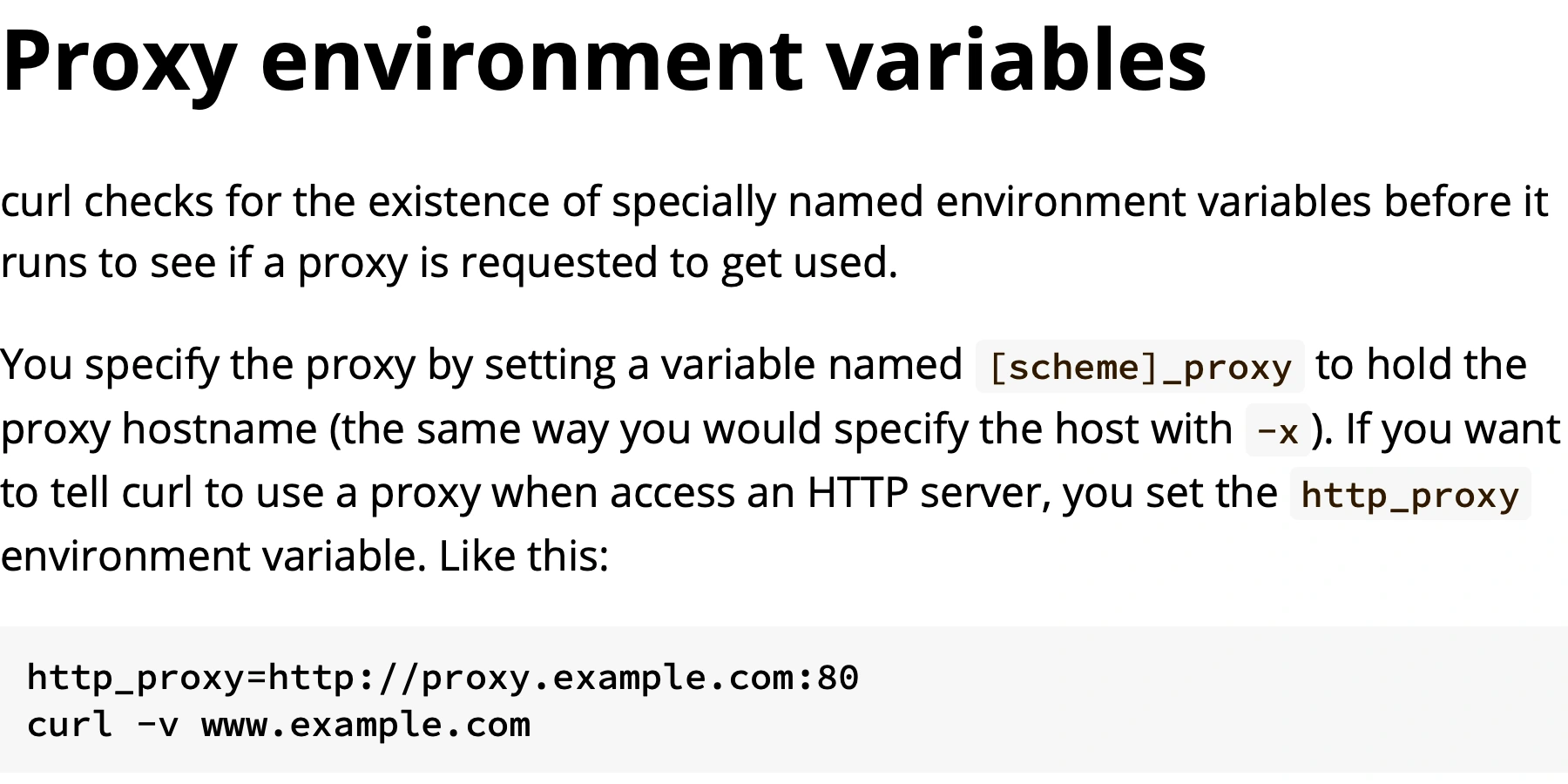
Screenshot: everything curl, captured November 21, 2026. The excerpt shows that the destination protocol selects the variable. It is documentation, not a capture of this Mac’s settings.
The scheme in the variable name and the scheme in its value describe different connections. For example, an HTTPS destination can use an HTTP proxy endpoint. Do not change https_proxy to http_proxy simply because the proxy address begins with http://.
Inspect only relevant settings locally and redact any credentials before sharing them. A shell startup file, an inherited variable and a default curl configuration file can explain why the same command behaves differently in two sessions.
What six local requests showed
On November 21, 2026, we tested macOS 15.7.5 with /usr/bin/curl 8.7.1. Two temporary HTTP responders listened only on 127.0.0.1, each on a different randomly assigned port.
One represented the destination. The other represented a proxy endpoint and returned a marker without forwarding traffic. Every request used the same HTTP URL. We removed proxy variables from each test process’s environment before adding the case-specific values, and used -q first.
| Case | Responder reached |
|---|---|
| No proxy variable or option | Destination |
Lowercase http_proxy | Proxy stand-in |
Uppercase HTTP_PROXY only | Destination |
https_proxy only, with an HTTP URL | Destination |
http_proxy plus matching NO_PROXY | Destination |
Explicit --proxy plus a different http_proxy | Explicit proxy stand-in |
The responders recorded the requests, so the result was more than a command exiting successfully. All six returned the expected marker.
This experiment verifies curl’s configuration choices for a local HTTP request. It does not test a real forwarding proxy, HTTPS tunneling, authentication, Safari, a VPN or a PAC script. We changed no system proxy setting. Those limits matter: a controlled configuration test is not evidence that a particular organization’s network works.
Treat a PAC URL as a separate input
An automatic proxy configuration URL identifies a script that can choose a proxy according to the requested destination. It is not interchangeable with a proxy server address.
The curl FAQ explains that curl has no built-in JavaScript/PAC execution. Passing the PAC URL to --proxy therefore does not make curl evaluate the script.
For a managed network, obtain the supported command-line configuration or the appropriate endpoint from its administrator. Do not replace a destination-dependent policy with one guessed address and assume every service should use it.
Likewise, compare the same destination while keeping the network and VPN state stable. A change in DNS lookup behavior can produce a different failure before you have established anything about the proxy.
Verify the request, then change the right layer
Record the curl executable and version, destination protocol, intended proxy, bypass rule and exact error. Use verbose diagnostics on a nonsensitive test request if necessary; they can contain headers, URLs and other private details, so review them before sharing.
A proxy connection can also explain why the remote endpoint you observe differs from the website’s hostname. Connection listings show endpoints, not the complete policy that selected them.
If the system settings are correct but curl lacks its own configuration, fix that invocation first. If curl reaches the intended proxy but the request fails, investigate the reported stage. If the request is intentionally bypassed, confirm that rule before removing it. The useful question is which configuration this request used, not whether the Mac has a proxy switch enabled.


