In this article
A newer Change value does not, by itself, mean that someone rewrote the document. Changing its permissions can update that timestamp while leaving the file's bytes and Birth time alone. The distinction matters when you compare an app's files before and after an update, investigate a surprising date, or read a script that calls something “created.”
Read the labels before comparing dates
Open Terminal and replace the example with the full path to the file you want to inspect:
/usr/bin/stat -x "/path/to/file"
The absolute command path selects the utility shipped with macOS. Its options differ from GNU stat, which you may have seen in a Linux tutorial or installed separately. This command reads metadata; it does not change permissions or rewrite the document.
For a regular file on our test Mac, the output ended with four labeled dates:
| Label | Field | What the value describes |
|---|---|---|
| Access | atime | An access-related timestamp, subject to filesystem behavior |
| Modify | mtime | The recorded last data modification |
| Change | ctime | The recorded last file-status change |
| Birth | birth time | The stored creation timestamp |
Apple's archived stat system-call reference separates these fields. It identifies both content writes and changes such as permissions as operations relevant to ctime. The reference is archival; the experiment below checks the distinction on macOS Sequoia 15.7.5.
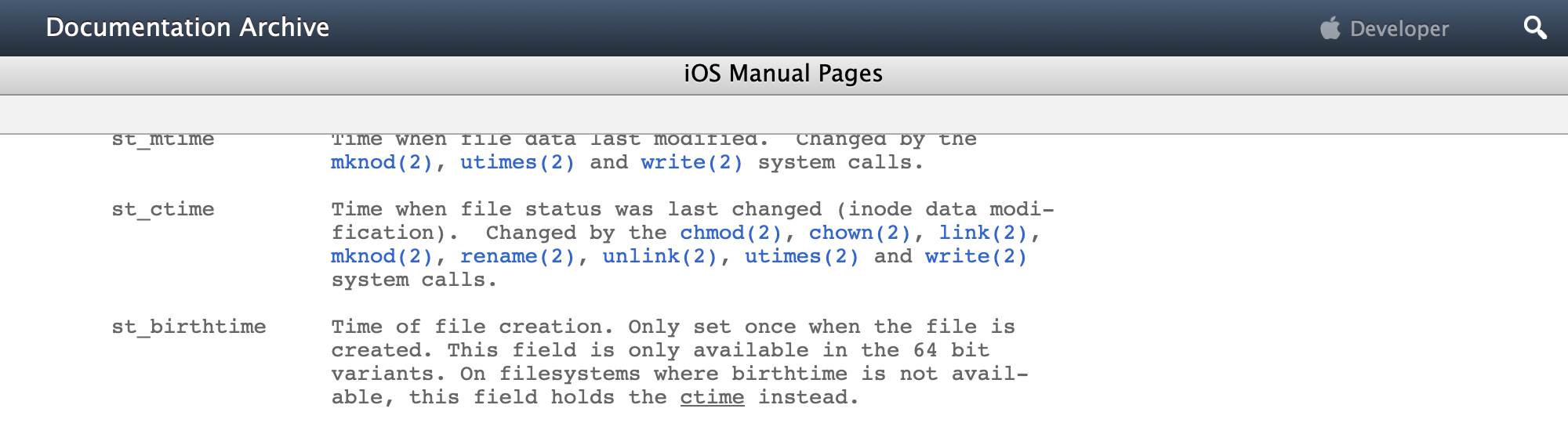
Apple Developer's stat reference, captured November 24, 2026. “File status” and “file creation” are separate definitions.
A permission change with identical file contents
On November 24, 2026, we created an owned 26-byte text fixture on a Mac running macOS 15.7.5, build 24G624. We recorded its metadata and SHA-256 digest, waited just over a second, then changed only its mode from 0644 to 0400.
The second mode made that fixture readable by its owner, without an owner write bit. This was an isolated demonstration on a new test file; no installed app or personal document was changed.
These values are transcribed from the captured native output. Times are on the same date and in the test Mac's Europe/Lisbon time zone, which was UTC that day:
| Observation | Modify | Change | Birth |
|---|---|---|---|
| Newly created fixture | 09:10:39 | 09:10:39 | 09:10:39 |
| After permission change | 09:10:39 | 09:10:40 | 09:10:39 |
| After restoring write access and appending content | 09:10:41 | 09:10:41 | 09:10:39 |
The first two SHA-256 digests matched exactly. The file was still 26 bytes, and its modification and birth timestamps matched at the precision captured by the test. Only the permission mode and status-change timestamp differed among those observations.
In the third stage, we restored owner write access and appended a line. The file became 40 bytes, its digest changed, and both Modify and Change advanced. Birth stayed the same. Because that stage included two actions, it is not a test of appending in isolation; it shows the final state after those recorded actions.
The important result is the second row: a later ctime can coexist with identical contents. Conversely, an unchanged digest says nothing about unchanged permissions. Our separate guide explains which metadata a file hash does and does not cover.
Why scripts sometimes call ctime “created”
The initial letter makes the wrong expansion tempting, and software APIs can make it worse. Python's os.path.getctime() documentation explicitly describes different meanings across operating systems. On Unix systems it is a metadata-change time; on Windows it is a creation time.
Therefore, a script copied from a Windows example can produce a plausible-looking but mislabeled date on a Mac. Formatting the number as a human-readable date does not change what it represents. Check the API field as well as the displayed column title.
For a quick native comparison without adding a programming language, macOS stat can print just the three fields relevant here:
/usr/bin/stat -f 'Birth: %SB | Modify: %Sm | Change: %Sc' -t '%Y-%m-%d %H:%M:%S %z' "/path/to/file"
The time-zone suffix helps when you compare output with a log recorded elsewhere. Keep the path quoted, especially when it contains spaces. If the file cannot be inspected, preserve the error and check the path and access first; missing output is not a zero timestamp.
Birth is a stored date, not a complete history
Reading Birth answers which creation timestamp the current file carries. It does not establish who created the information inside it, when you first received it, or when an application was installed on this Mac.
For example, our earlier Finder install-date test copied an app bundle and found that the copy retained older creation and modification dates. That is a different question from today's ctime experiment, but the practical lesson is related: identify the event before attaching a date to it.
An editor may also replace a file with a new one when saving. A copy, restore or replacement deserves separate investigation; do not assume that every tool preserves or resets the same fields. When comparing two observations, record the full path and consider whether they still describe the same filesystem object.
Keep the conclusion narrower than the timestamp
For a useful comparison, save the initial stat output before changing anything. Record the action you perform, then capture the same fields again. If your question concerns the file's contents, compare the contents or a digest as well. If it concerns access, inspect the permissions.
A ctime value alone does not identify a responsible app, a user, or a sequence of earlier changes. It also cannot establish that a file is malicious. A timestamp mismatch is a clue to explain, not a verdict.
For future app investigations, a before-and-after file comparison gives you a stronger starting point than reconstructing events from one surviving date. Keep Birth, Modify and Change under their own labels, and leave any missing history unresolved.